> ## Documentation Index
> Fetch the complete documentation index at: https://docs.whitechain.io/llms.txt
> Use this file to discover all available pages before exploring further.
# Use the Portal bridge
> Step by step walkthrough of the Portal bridge app: connect a wallet, choose a route, set a recipient, confirm a transfer, and track it to completion.
The Portal app and its contracts run on Testnet: Whitechain Sepolia (chain ID 1874), Ethereum Sepolia, and Tron Nile. The app runs at [bridge.testnet.whitechain.io](https://bridge.testnet.whitechain.io). Mainnet routes and addresses are published at Mainnet launch.
## Overview
This page walks through one Portal transfer in the app, screen by screen. Open [bridge.testnet.whitechain.io](https://bridge.testnet.whitechain.io) to follow along. For the trust model, routes, fees, limits, and contract addresses, see [Portal bridge](/build/bridge/portal-bridge).
Every route runs both ways. The screens below follow WBT from Whitechain to Ethereum. The reverse direction differs in two places, both called out below. Fees are denominated in the source network's token, and a token route asks for an approval before the transfer.
The app is a browser page that your own wallet signs for. It never holds your keys or your funds, and it never asks for them. The bridge itself is a different matter: while a transfer is in flight, your funds sit in Portal contracts that Whitechain controls. See [Custody and the alternative path](#custody-and-the-alternative-path).
## Before you start
| Requirement | Detail |
| -------------------------------- | ------------------------------------------------------------------------------------------------------------------------------------------------------------------------------------------------------------------- |
| A wallet | An EVM wallet for Ethereum and Whitechain routes. A Tron wallet for Tron routes. |
| Whitechain Sepolia in the wallet | The app can add it for you, or add it manually. The app labels this network Whitechain Testnet on screen. See [Configure a wallet](/build/wallet/wallets). |
| Testnet WBT for gas | WBT is the native gas token on Whitechain. Get it from the [faucet](/learn/get-started/get-testnet-wbt). |
| The asset you want to move | The Portal carries four configured assets, USDC, USDT, WBT, and ETH, and the app shows which networks each one reaches. See [Supported routes and assets](/build/bridge/portal-bridge#supported-routes-and-assets). |
## The bridge form
The form is explorable before you connect anything. You can pick networks and a token, and read the estimate line, while only the submit button stays gated.
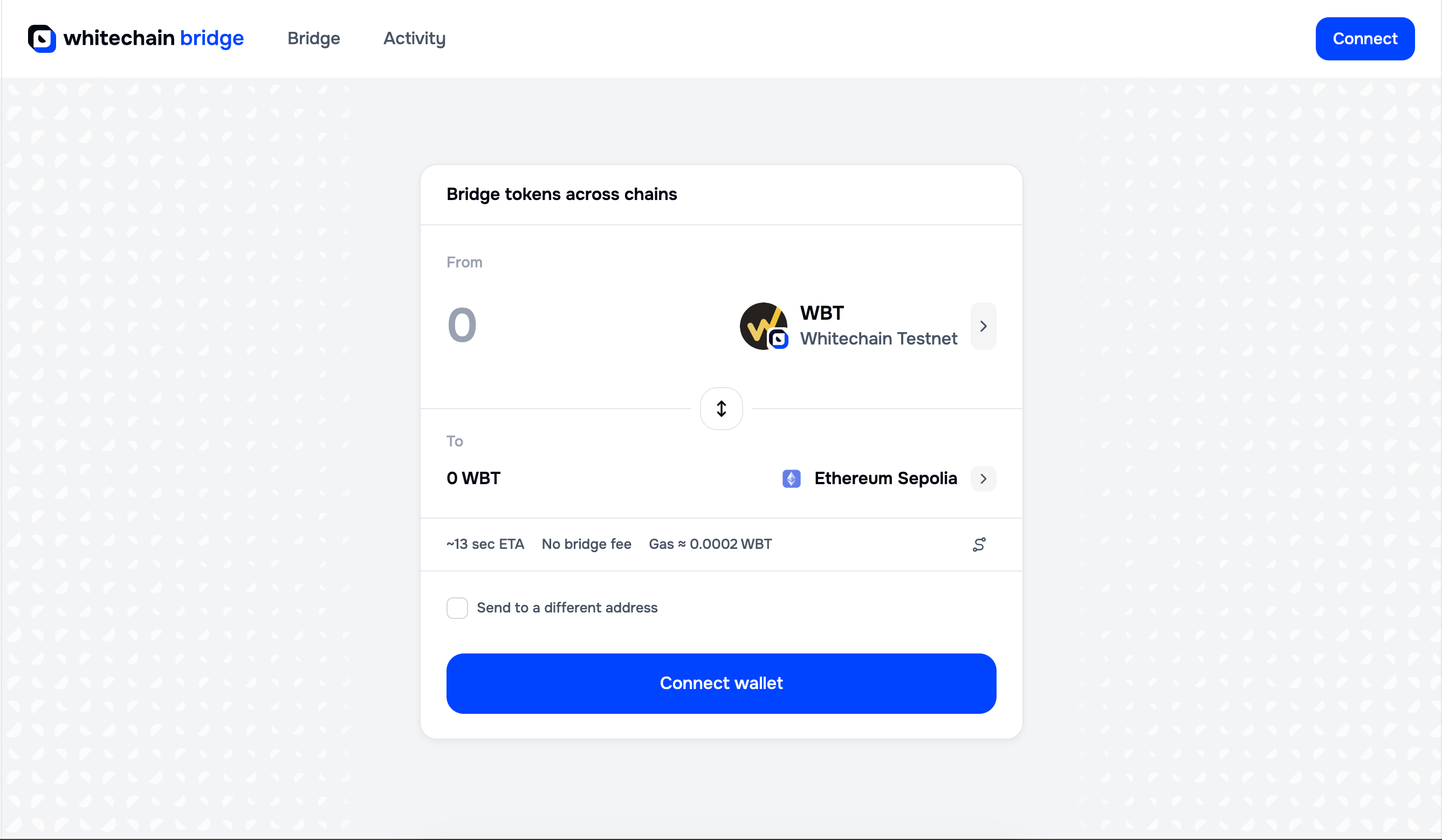 | Field | What it does |
| --------------------------- | ------------------------------------------------------------------------------------------------------------------- |
| From | The source network and the token you are sending. Shows your balance once a wallet is connected, plus a Max action. |
| To | The destination network and the amount that arrives. |
| Swap arrows | The control between From and To reverses the direction. |
| Estimate line | Estimated time, the bridge fee, and the gas for your own transaction. |
| Send to a different address | Sends the funds to an address other than the connected wallet. |
### Choose the asset and the network
Both rows carry an asset chip, and selecting one opens a two-step picker. The first step is the asset.
| Field | What it does |
| --------------------------- | ------------------------------------------------------------------------------------------------------------------- |
| From | The source network and the token you are sending. Shows your balance once a wallet is connected, plus a Max action. |
| To | The destination network and the amount that arrives. |
| Swap arrows | The control between From and To reverses the direction. |
| Estimate line | Estimated time, the bridge fee, and the gas for your own transaction. |
| Send to a different address | Sends the funds to an address other than the connected wallet. |
### Choose the asset and the network
Both rows carry an asset chip, and selecting one opens a two-step picker. The first step is the asset.
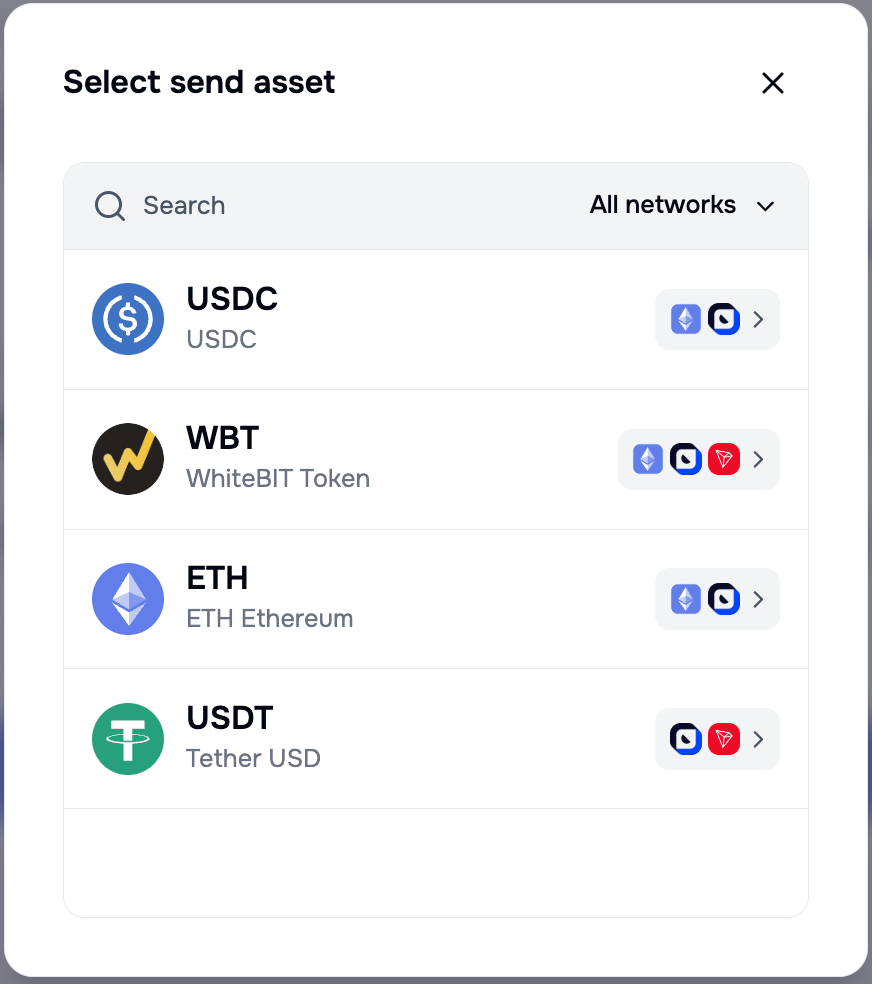 Read the icons on the right of each row before you pick. They are the networks that asset reaches, so they tell you which routes exist for it without trial and error. Search filters by name, and **All networks** narrows the list to a single network.
The second step is the network, and it offers only the networks the chosen asset supports. The back arrow returns to the asset list.
Read the icons on the right of each row before you pick. They are the networks that asset reaches, so they tell you which routes exist for it without trial and error. Search filters by name, and **All networks** narrows the list to a single network.
The second step is the network, and it offers only the networks the chosen asset supports. The back arrow returns to the asset list.
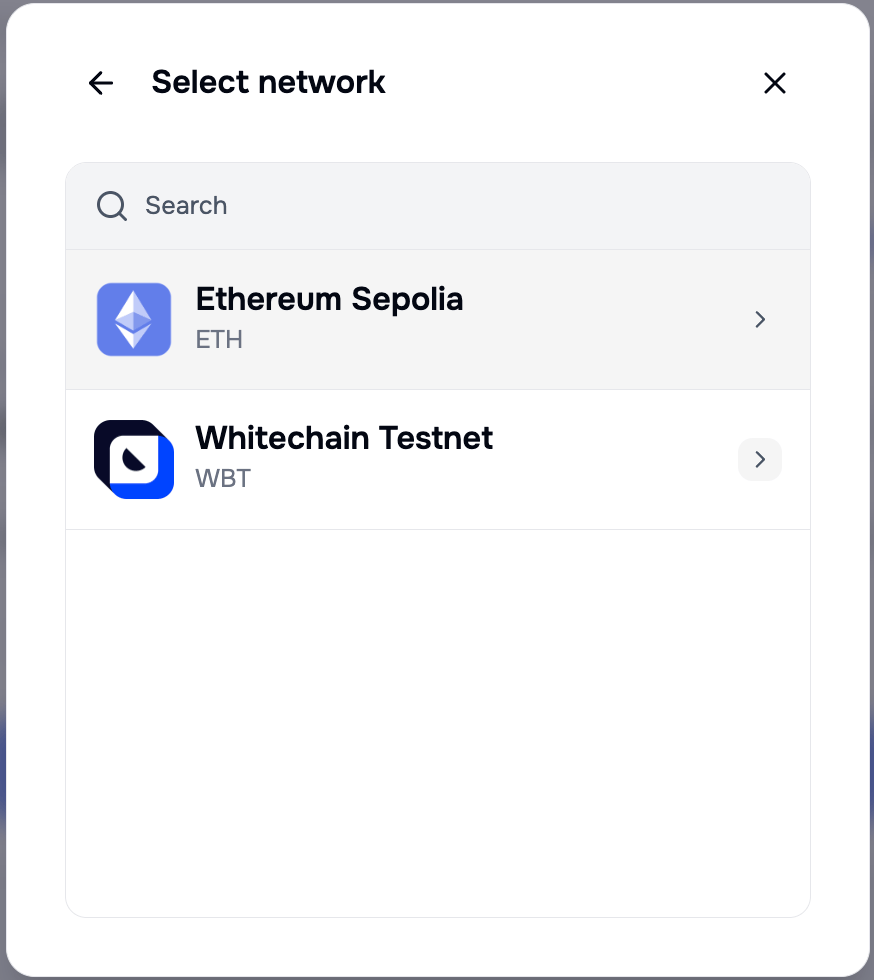 An asset that the Portal does not carry in the direction you want is not selectable, so a route you cannot build never reaches the point of a failed transaction.
The picker lists ETH, and the route behind it holds WETH on Ethereum. You supply native ETH and the app wraps it for the transfer, so you never have to obtain WETH yourself. On Whitechain the arriving ETH is a bridged ERC-20 that you add by contract address like any other bridged token, and it cannot pay gas. See [Supported routes and assets](/build/bridge/portal-bridge#supported-routes-and-assets).
## Connect a wallet
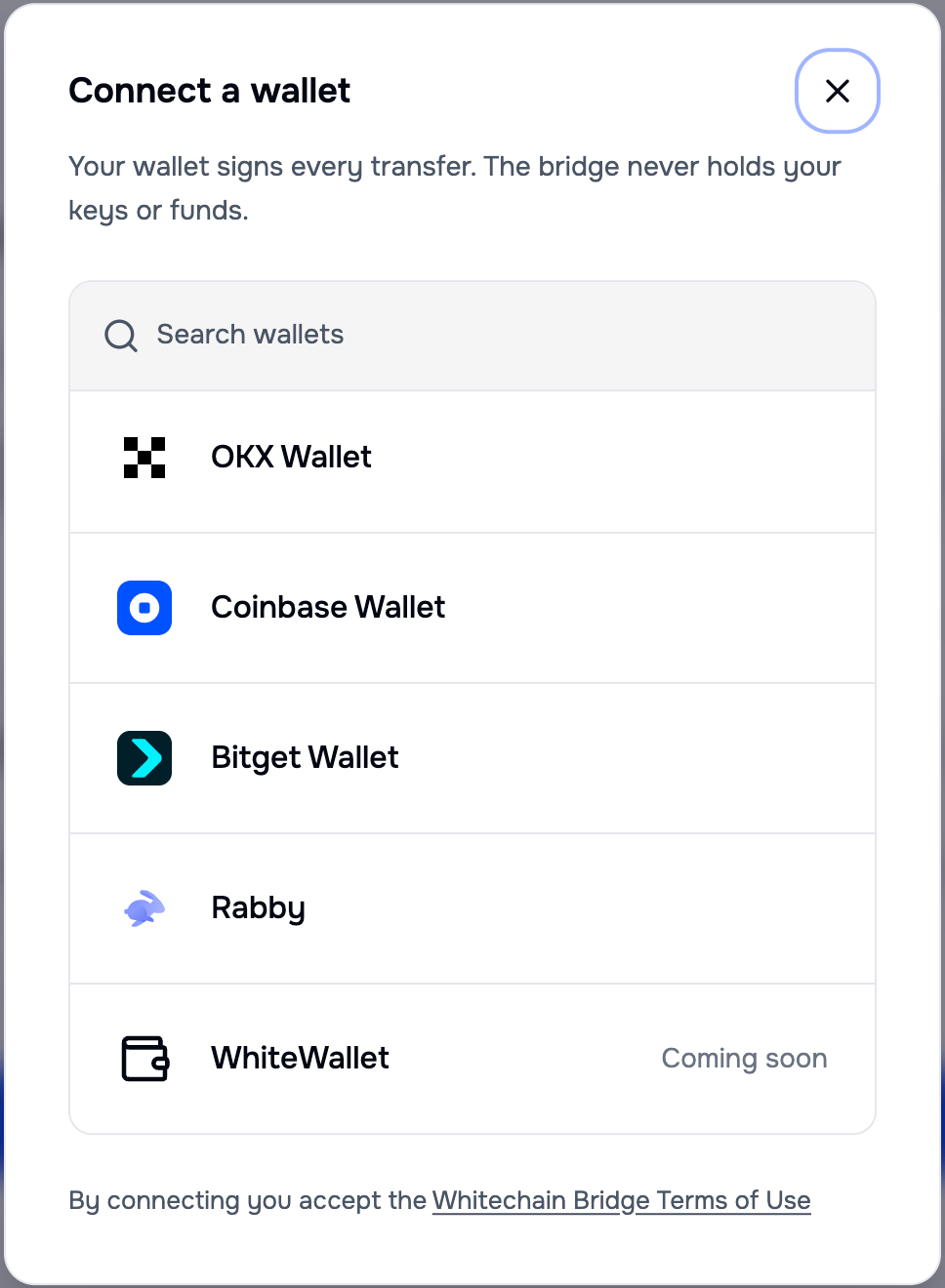
Select **Connect wallet**. The dialog has a search field, marks a detected wallet as Installed, and scrolls through the full list.
An asset that the Portal does not carry in the direction you want is not selectable, so a route you cannot build never reaches the point of a failed transaction.
The picker lists ETH, and the route behind it holds WETH on Ethereum. You supply native ETH and the app wraps it for the transfer, so you never have to obtain WETH yourself. On Whitechain the arriving ETH is a bridged ERC-20 that you add by contract address like any other bridged token, and it cannot pay gas. See [Supported routes and assets](/build/bridge/portal-bridge#supported-routes-and-assets).
## Connect a wallet
Select **Connect wallet**. The dialog has a search field, marks a detected wallet as Installed, and scrolls through the full list.
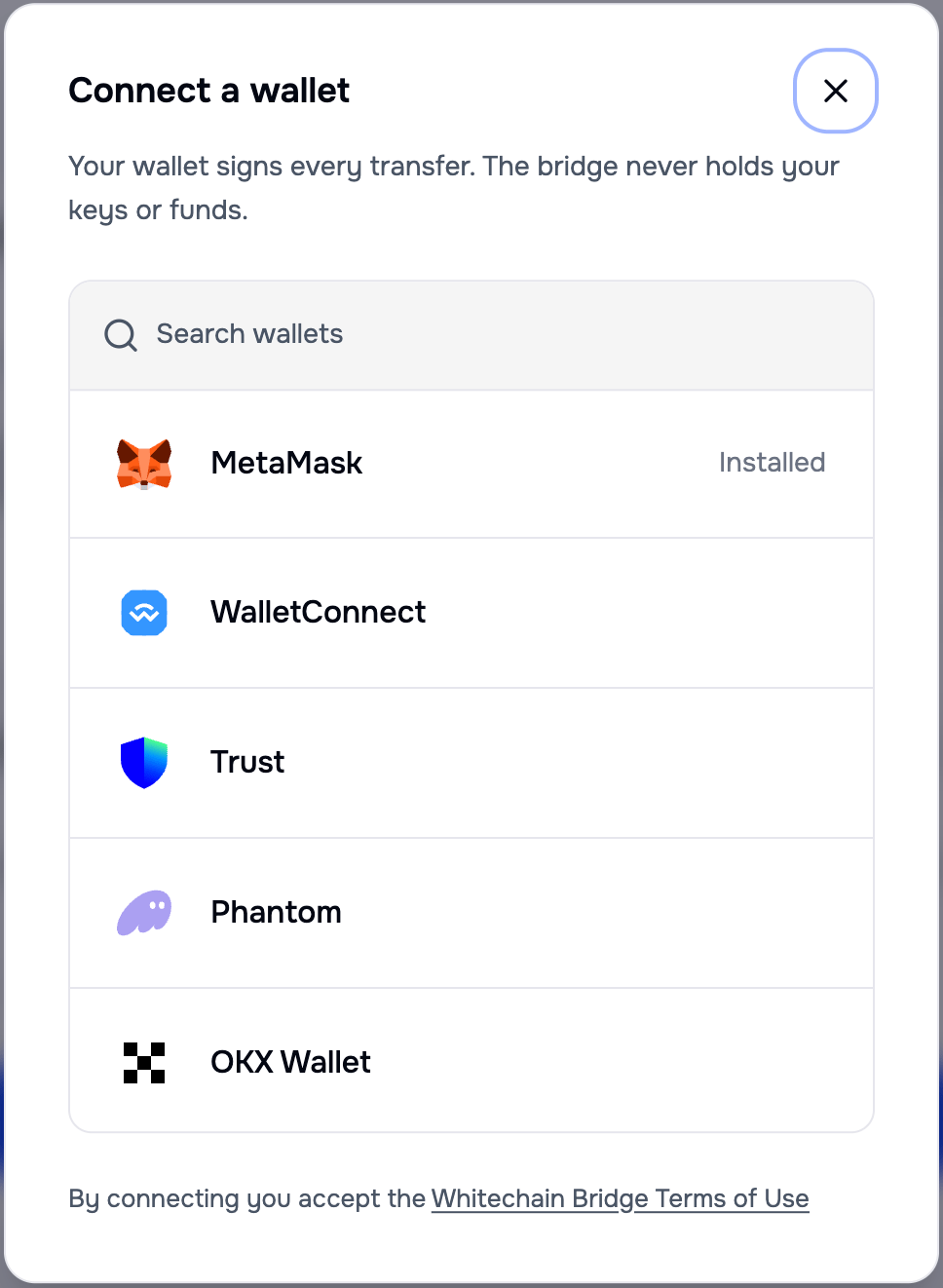
 | Wallet | In the app today |
| --------------- | ------------------------------------------ |
| MetaMask | Available |
| WalletConnect | Available |
| Trust | Available |
| Phantom | Available, EVM mode only |
| OKX Wallet | Available |
| Coinbase Wallet | Available |
| Bitget Wallet | Available |
| Rabby | Available |
| WhiteWallet | Listed as coming soon, not connectable yet |
An EVM wallet outside the named set still connects through WalletConnect v2, so the list is a support commitment rather than a whitelist that blocks other wallets.
Phantom connects in EVM mode only: no Solana account, network, or route appears anywhere in the flow. A wallet that is not installed shows an install action instead of a connect attempt that fails.
### Tron routes need a Tron wallet
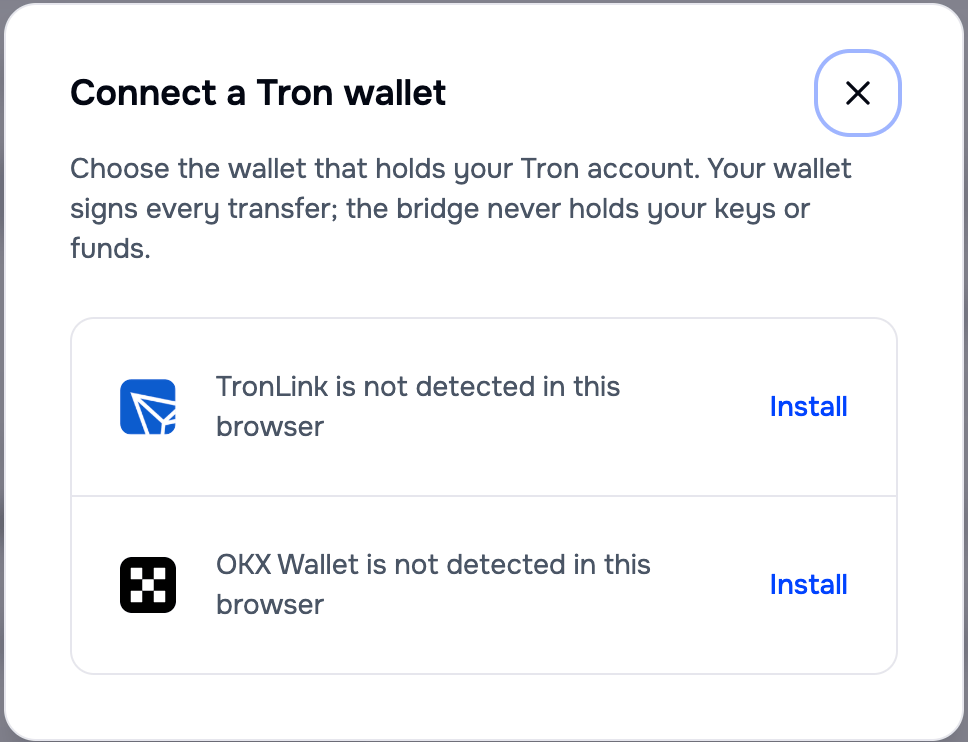
Tron routes connect through the TronLink or OKX wallet adapters.
A Tron route requires the Tron wallet, and the app never asks an EVM wallet to sign a Tron transaction, or the reverse.
| Wallet | In the app today |
| --------------- | ------------------------------------------ |
| MetaMask | Available |
| WalletConnect | Available |
| Trust | Available |
| Phantom | Available, EVM mode only |
| OKX Wallet | Available |
| Coinbase Wallet | Available |
| Bitget Wallet | Available |
| Rabby | Available |
| WhiteWallet | Listed as coming soon, not connectable yet |
An EVM wallet outside the named set still connects through WalletConnect v2, so the list is a support commitment rather than a whitelist that blocks other wallets.
Phantom connects in EVM mode only: no Solana account, network, or route appears anywhere in the flow. A wallet that is not installed shows an install action instead of a connect attempt that fails.
### Tron routes need a Tron wallet
Tron routes connect through the TronLink or OKX wallet adapters.
A Tron route requires the Tron wallet, and the app never asks an EVM wallet to sign a Tron transaction, or the reverse.
 ## Switch to the source network
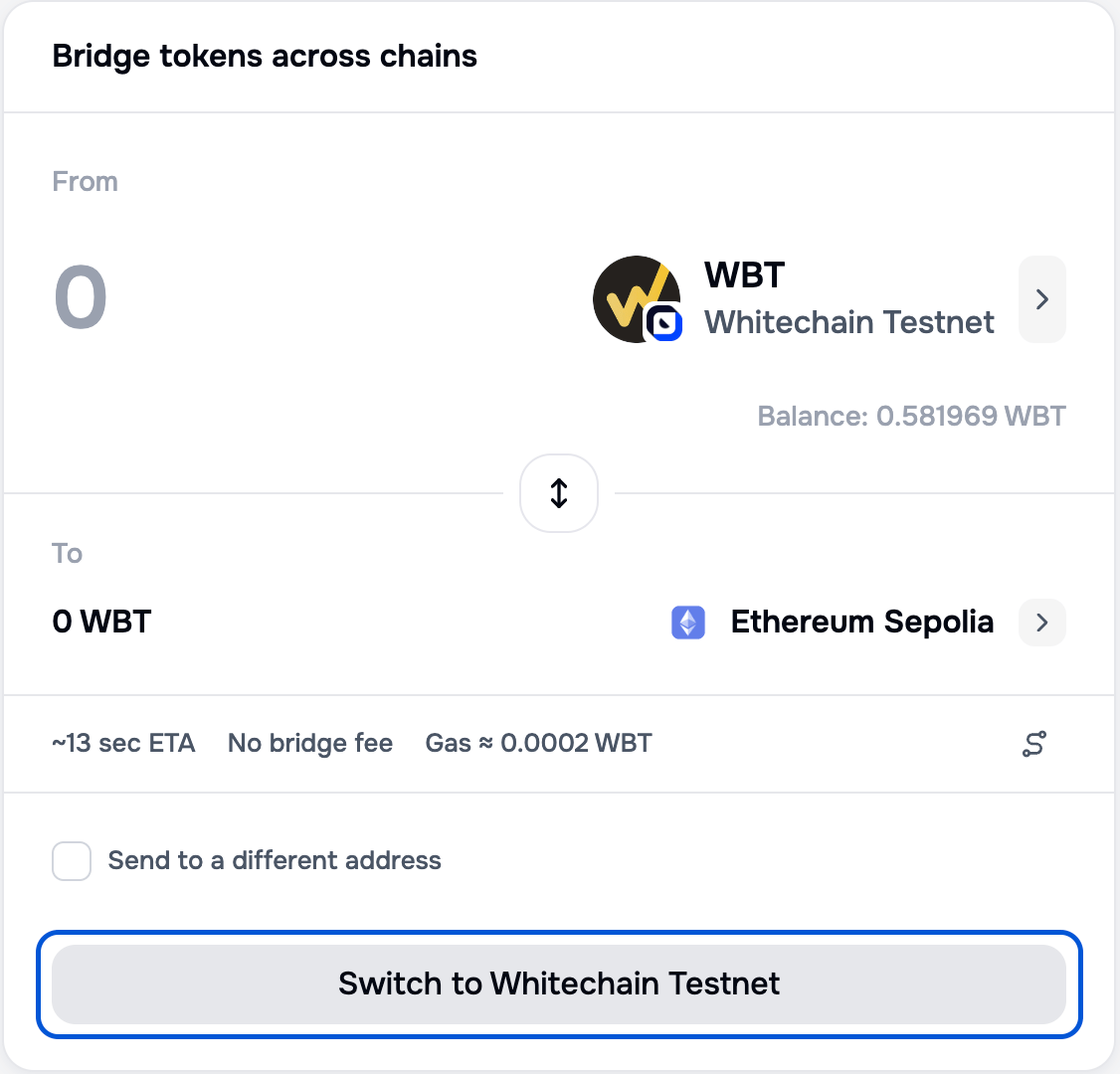
Your wallet has to be on the network you are sending from. When it is not, the submit button becomes a switch action naming the network you need, and no transfer can be submitted until you take it.
## Switch to the source network
Your wallet has to be on the network you are sending from. When it is not, the submit button becomes a switch action naming the network you need, and no transfer can be submitted until you take it.
 ## Enter an amount
Type an amount, or select **Max**. Once there is an amount, the estimate line prices the transfer.
## Enter an amount
Type an amount, or select **Max**. Once there is an amount, the estimate line prices the transfer.
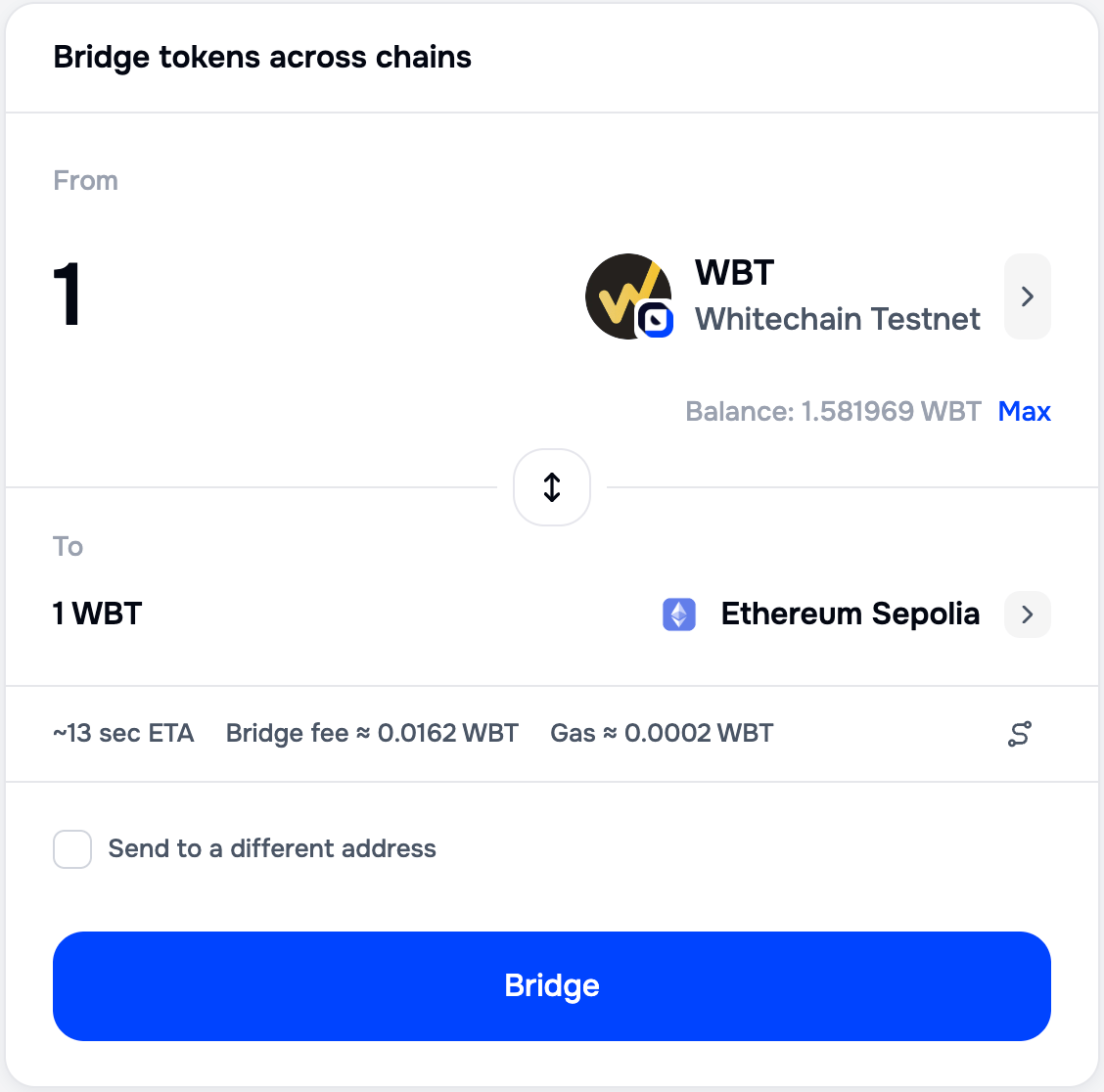 Max resolves to the largest amount you can actually send, which is the tightest of your balance, the remaining daily limit, and the liquidity available on the destination network.
The estimate line separates two costs that are easy to confuse. Both are denominated in the native token of the network you are sending from, so they read in WBT leaving Whitechain and in ETH leaving Ethereum.
| Line | What it covers |
| ---------- | ------------------------------------------------------------------------------------------------------------------------------------------ |
| Bridge fee | The Portal charges no bridging fee today. On a Whitechain to Ethereum transfer this line carries the Ethereum gas the Portal pays for you. |
| Gas | The source network gas for your own transaction, which your wallet charges you directly. |
For how the WBT figure is derived, see [Fees and limits](/build/bridge/portal-bridge#fees-and-limits).
If the amount breaks a rule, the form says which one: below the minimum, above your balance, above the remaining daily limit, or above the destination liquidity. Each case names the cause and what to do next, so a rejected amount never reaches your wallet.
## Send to a different address
Select **Send to a different address** to enter a recipient other than the connected wallet. Leave it clear and the funds arrive at the address you connected with.
Max resolves to the largest amount you can actually send, which is the tightest of your balance, the remaining daily limit, and the liquidity available on the destination network.
The estimate line separates two costs that are easy to confuse. Both are denominated in the native token of the network you are sending from, so they read in WBT leaving Whitechain and in ETH leaving Ethereum.
| Line | What it covers |
| ---------- | ------------------------------------------------------------------------------------------------------------------------------------------ |
| Bridge fee | The Portal charges no bridging fee today. On a Whitechain to Ethereum transfer this line carries the Ethereum gas the Portal pays for you. |
| Gas | The source network gas for your own transaction, which your wallet charges you directly. |
For how the WBT figure is derived, see [Fees and limits](/build/bridge/portal-bridge#fees-and-limits).
If the amount breaks a rule, the form says which one: below the minimum, above your balance, above the remaining daily limit, or above the destination liquidity. Each case names the cause and what to do next, so a rejected amount never reaches your wallet.
## Send to a different address
Select **Send to a different address** to enter a recipient other than the connected wallet. Leave it clear and the funds arrive at the address you connected with.
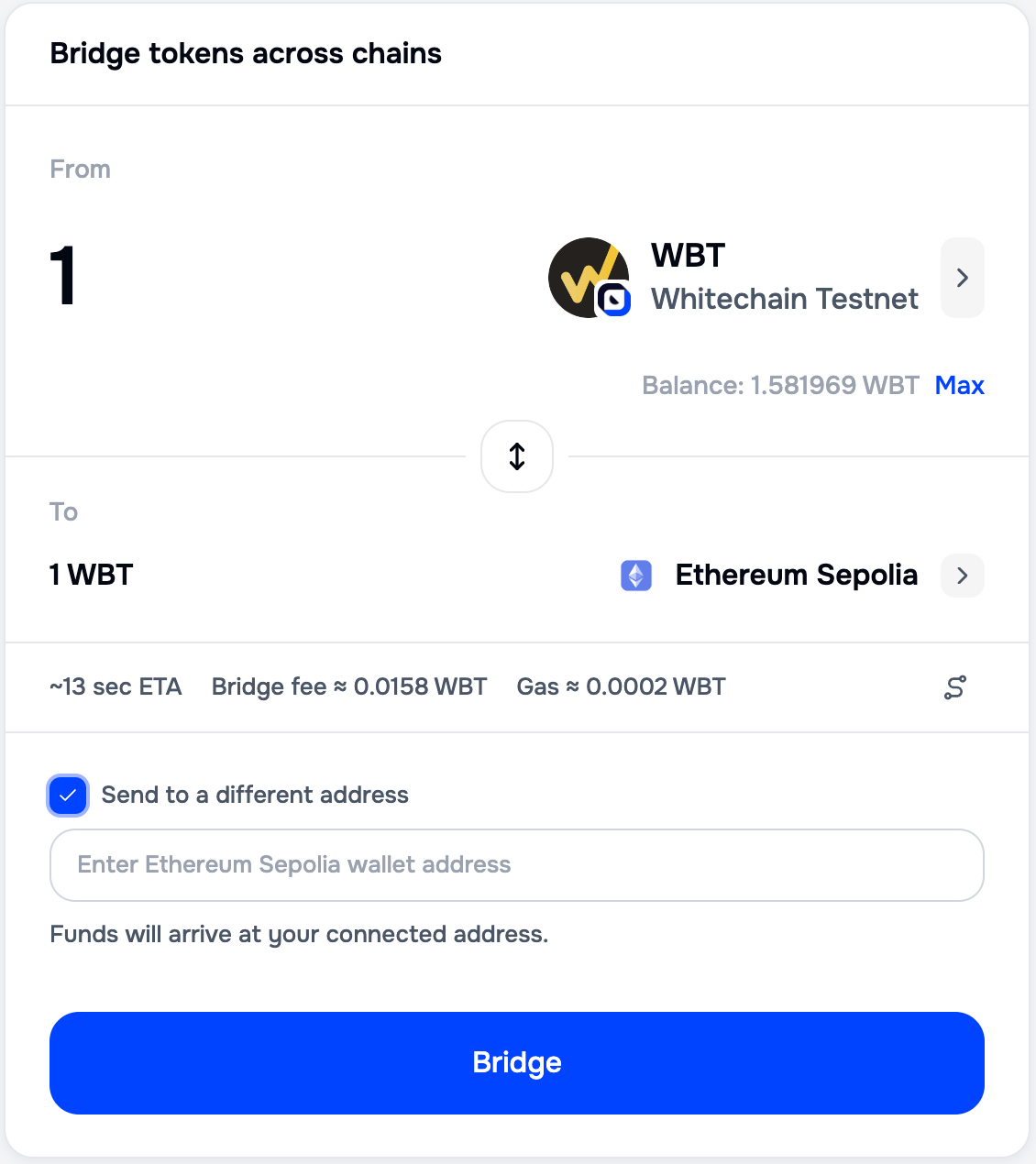 The address is checked against the destination network, so a Tron address entered for an EVM destination is rejected with a specific message rather than accepted. A custom recipient asks you to confirm a second time, because the transfer cannot be reversed once it is signed.
## Review and confirm
With the wallet on the right network and a valid amount, the submit button becomes **Bridge**.
The address is checked against the destination network, so a Tron address entered for an EVM destination is rejected with a specific message rather than accepted. A custom recipient asks you to confirm a second time, because the transfer cannot be reversed once it is signed.
## Review and confirm
With the wallet on the right network and a valid amount, the submit button becomes **Bridge**.
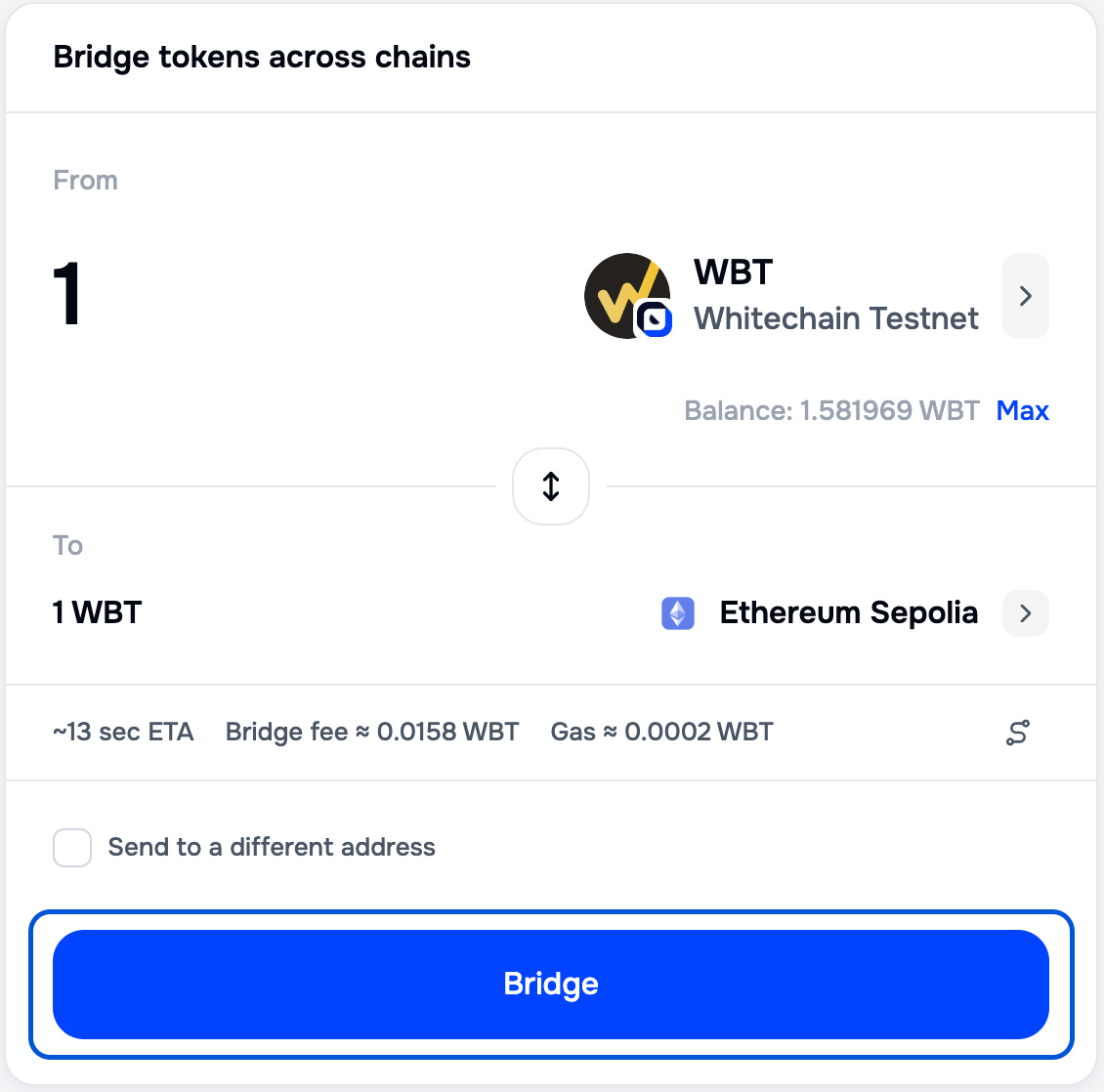 Selecting Bridge opens the review, which is the last screen before any signature.
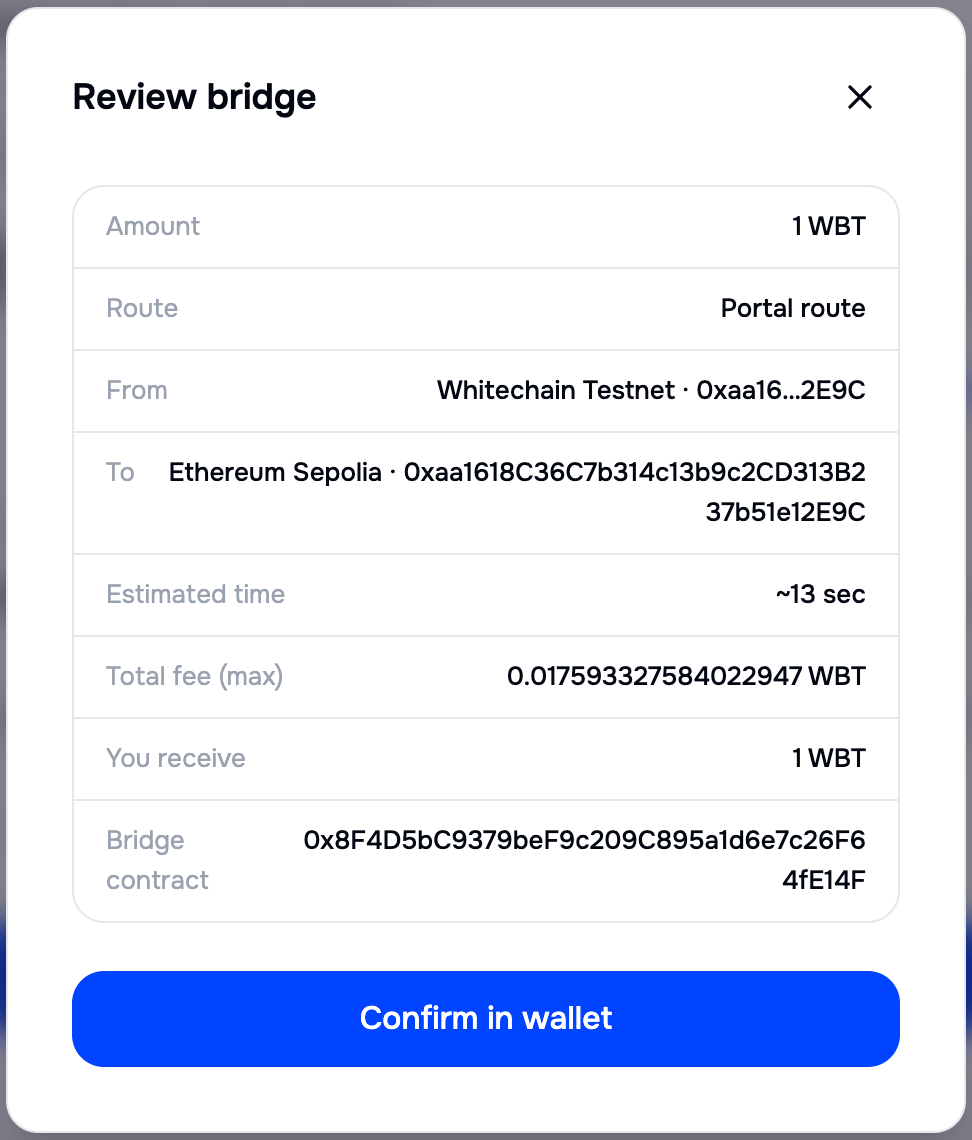 | Review field | Why it matters |
| ---------------------- | --------------------------------------------------------------------------------------------------------------------------------- |
| Amount and You receive | What leaves and what arrives. Compare the two before signing. |
| Route | The engine handling the transfer. The Portal is the only route in the app today. |
| From and To | Both networks, and the recipient address in full rather than truncated. |
| Estimated time | How long the transfer is expected to take. |
| Total fee (max) | The ceiling on what you pay. The transfer cannot cost more than this. |
| Bridge contract | The contract your wallet is about to call. Check it against [Contract addresses](/build/bridge/portal-bridge#contract-addresses). |
Select **Confirm in wallet**, then confirm in your wallet.
### Token routes ask for two signatures
How many signatures you give depends on what you are sending. The native token of the source network takes one, the transfer itself, which is the case for WBT leaving Whitechain, because WBT is the gas token there. A token contract takes two, first an approval and then the transfer, which is the case for the same WBT leaving Ethereum, where it is an ERC-20.
The review screen tells you which one you are in for before you sign anything.
| Review field | Why it matters |
| ---------------------- | --------------------------------------------------------------------------------------------------------------------------------- |
| Amount and You receive | What leaves and what arrives. Compare the two before signing. |
| Route | The engine handling the transfer. The Portal is the only route in the app today. |
| From and To | Both networks, and the recipient address in full rather than truncated. |
| Estimated time | How long the transfer is expected to take. |
| Total fee (max) | The ceiling on what you pay. The transfer cannot cost more than this. |
| Bridge contract | The contract your wallet is about to call. Check it against [Contract addresses](/build/bridge/portal-bridge#contract-addresses). |
Select **Confirm in wallet**, then confirm in your wallet.
### Token routes ask for two signatures
How many signatures you give depends on what you are sending. The native token of the source network takes one, the transfer itself, which is the case for WBT leaving Whitechain, because WBT is the gas token there. A token contract takes two, first an approval and then the transfer, which is the case for the same WBT leaving Ethereum, where it is an ERC-20.
The review screen tells you which one you are in for before you sign anything.
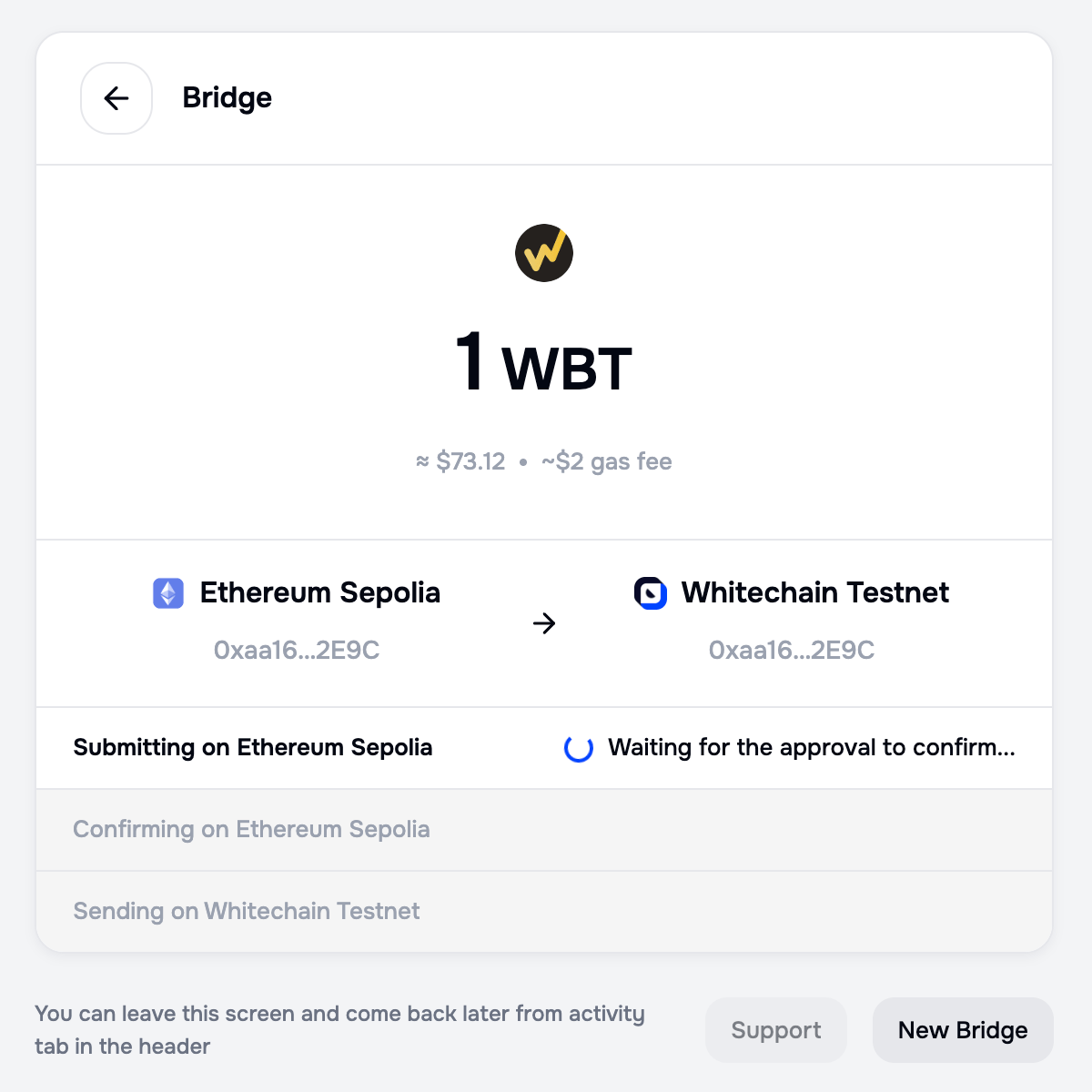
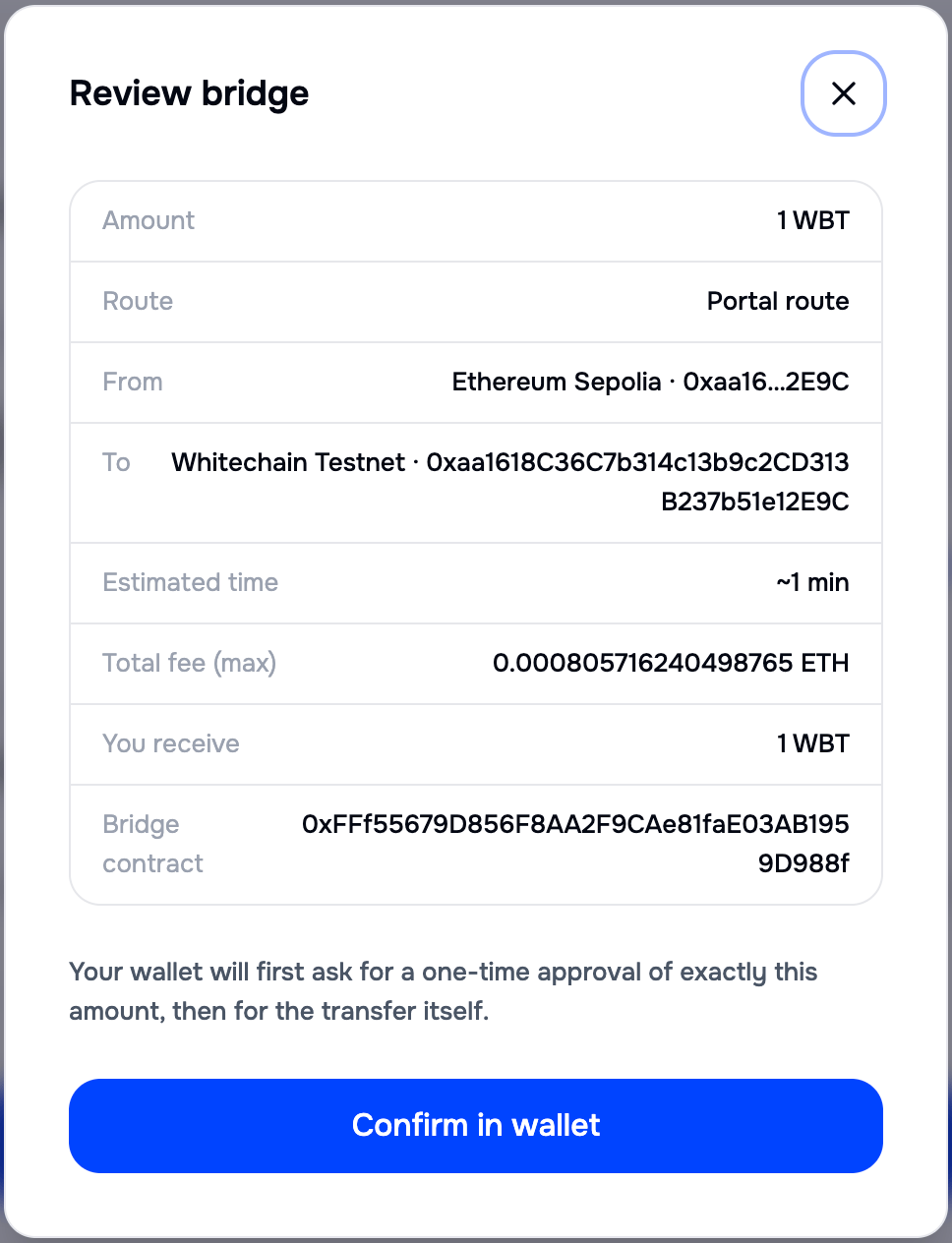 The app requests an approval for the exact transfer amount, never an unlimited allowance.
The tracker then waits on that first signature before it asks for the second, so a transfer sitting at Waiting for the approval to confirm needs you to act in your wallet.
The app requests an approval for the exact transfer amount, never an unlimited allowance.
The tracker then waits on that first signature before it asks for the second, so a transfer sitting at Waiting for the approval to confirm needs you to act in your wallet.
 On a token route the Details menu carries a **Review token approvals** link as well, so you can check what you have granted.
Verify the bridge contract address on the review screen against [Contract addresses](/build/bridge/portal-bridge#contract-addresses) before you sign. A transfer sent to the wrong contract cannot be recovered.
## Track the transfer
After you sign, the app shows a live tracker. You can close the tab: the transfer continues, and you can reopen it from **Activity**.
The tracker moves through three stages, then marks the transfer complete. The screens below show them in order.
On a token route the Details menu carries a **Review token approvals** link as well, so you can check what you have granted.
Verify the bridge contract address on the review screen against [Contract addresses](/build/bridge/portal-bridge#contract-addresses) before you sign. A transfer sent to the wrong contract cannot be recovered.
## Track the transfer
After you sign, the app shows a live tracker. You can close the tab: the transfer continues, and you can reopen it from **Activity**.
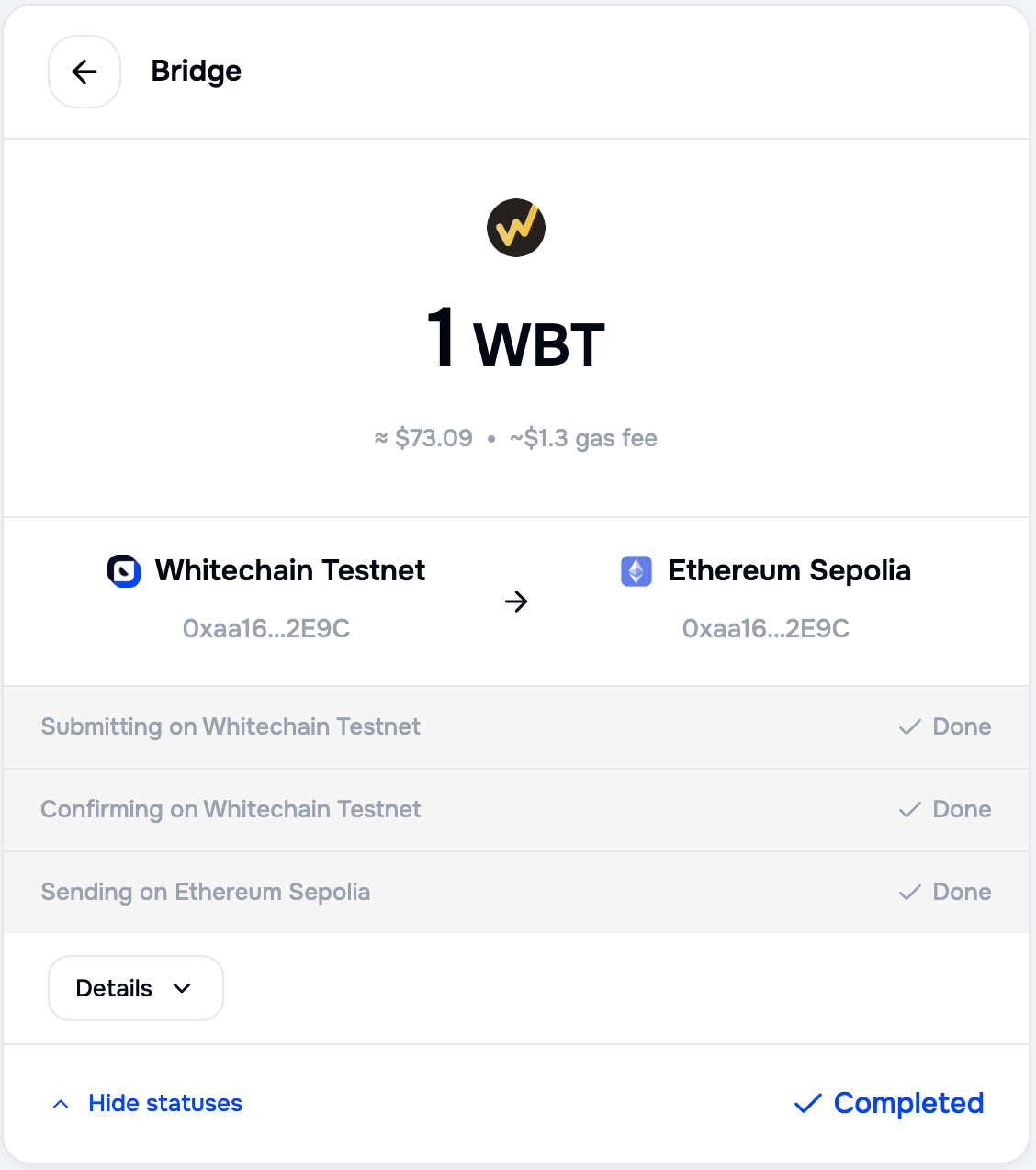
The tracker moves through three stages, then marks the transfer complete. The screens below show them in order.
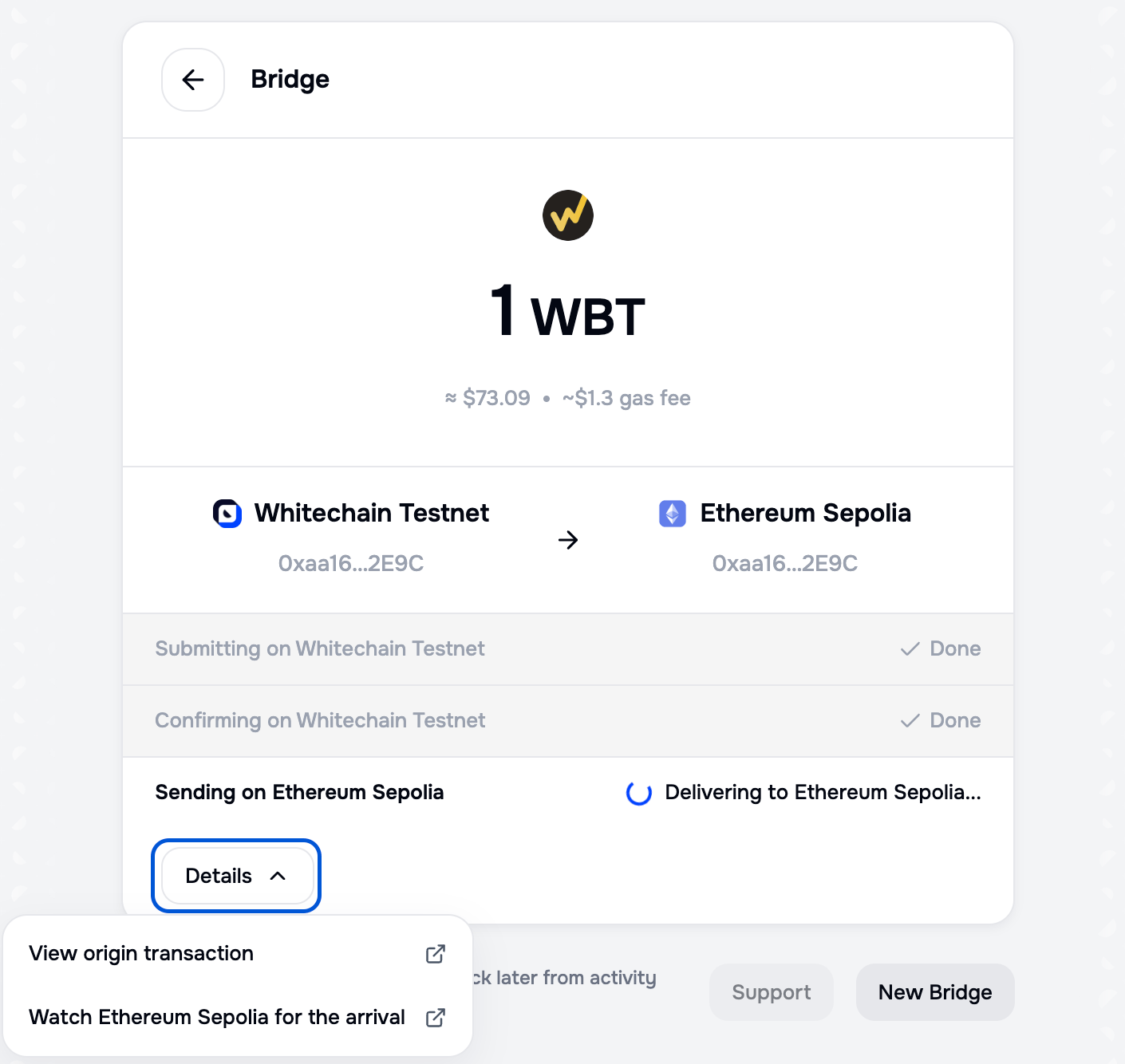 | Stage | What is happening |
| ---------- | ------------------------------------------------------------------------------------------------------- |
| Submitting | Your transaction is being sent on the source network, and your wallet is waiting for your confirmation. |
| Confirming | The source network is confirming your transaction. |
| Sending | The Portal has seen your deposit and is releasing the funds on the destination network. |
| Completed | The funds have been sent on the destination network. |
**Details** links the source transaction and the destination network in a block explorer, so you can follow the transfer outside the app.
The app labels a transfer that runs past its expected time as delayed rather than failed, and offers the support path. Nothing is lost while it is delayed.
| Stage | What is happening |
| ---------- | ------------------------------------------------------------------------------------------------------- |
| Submitting | Your transaction is being sent on the source network, and your wallet is waiting for your confirmation. |
| Confirming | The source network is confirming your transaction. |
| Sending | The Portal has seen your deposit and is releasing the funds on the destination network. |
| Completed | The funds have been sent on the destination network. |
**Details** links the source transaction and the destination network in a block explorer, so you can follow the transfer outside the app.
The app labels a transfer that runs past its expected time as delayed rather than failed, and offers the support path. Nothing is lost while it is delayed.
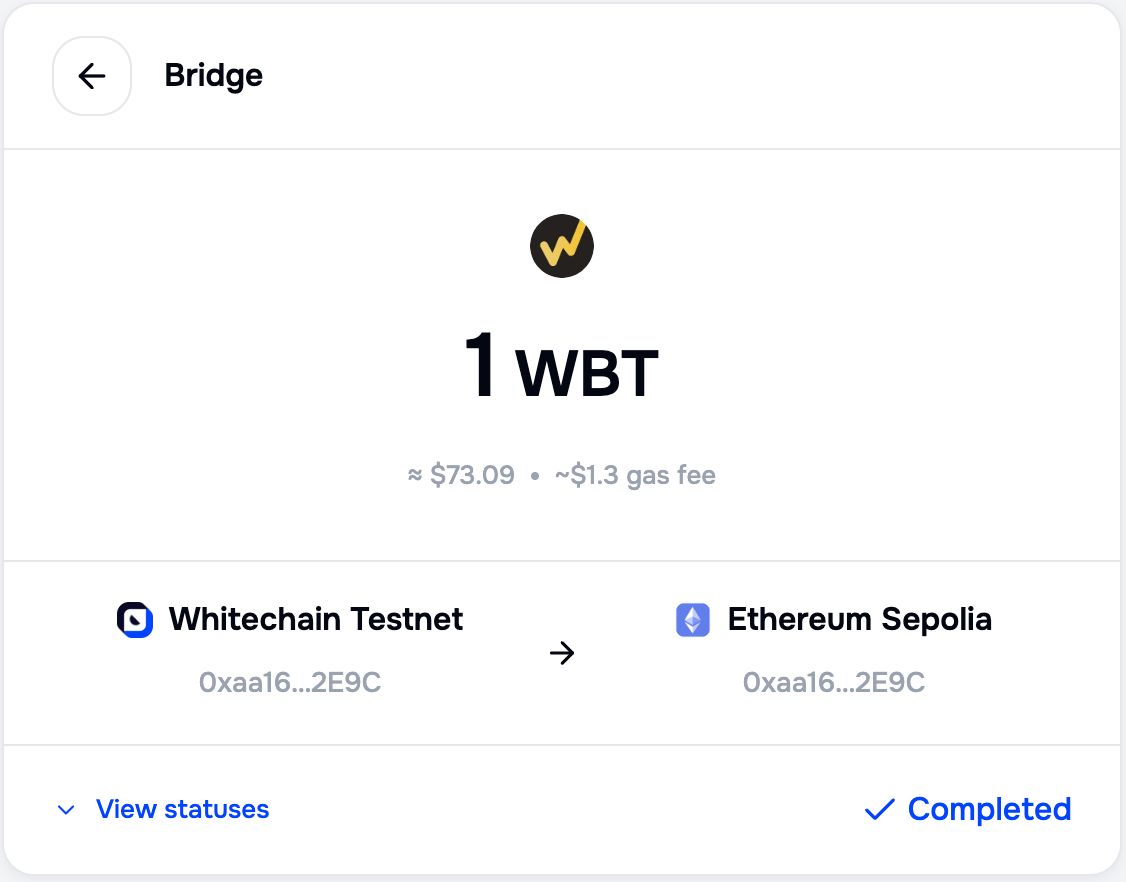 Select **View statuses** to expand the full stage list on a finished transfer.
 A bridged token does not appear in your wallet on its own. Add the destination token by its contract address, from [Token addresses](/build/bridge/portal-bridge#token-addresses).
### When a transfer fails
A stage that fails is marked **Failed**, and a banner names the network it failed on. The stages before it keep their state, so you can see how far the transfer got.
A bridged token does not appear in your wallet on its own. Add the destination token by its contract address, from [Token addresses](/build/bridge/portal-bridge#token-addresses).
### When a transfer fails
A stage that fails is marked **Failed**, and a banner names the network it failed on. The stages before it keep their state, so you can see how far the transfer got.
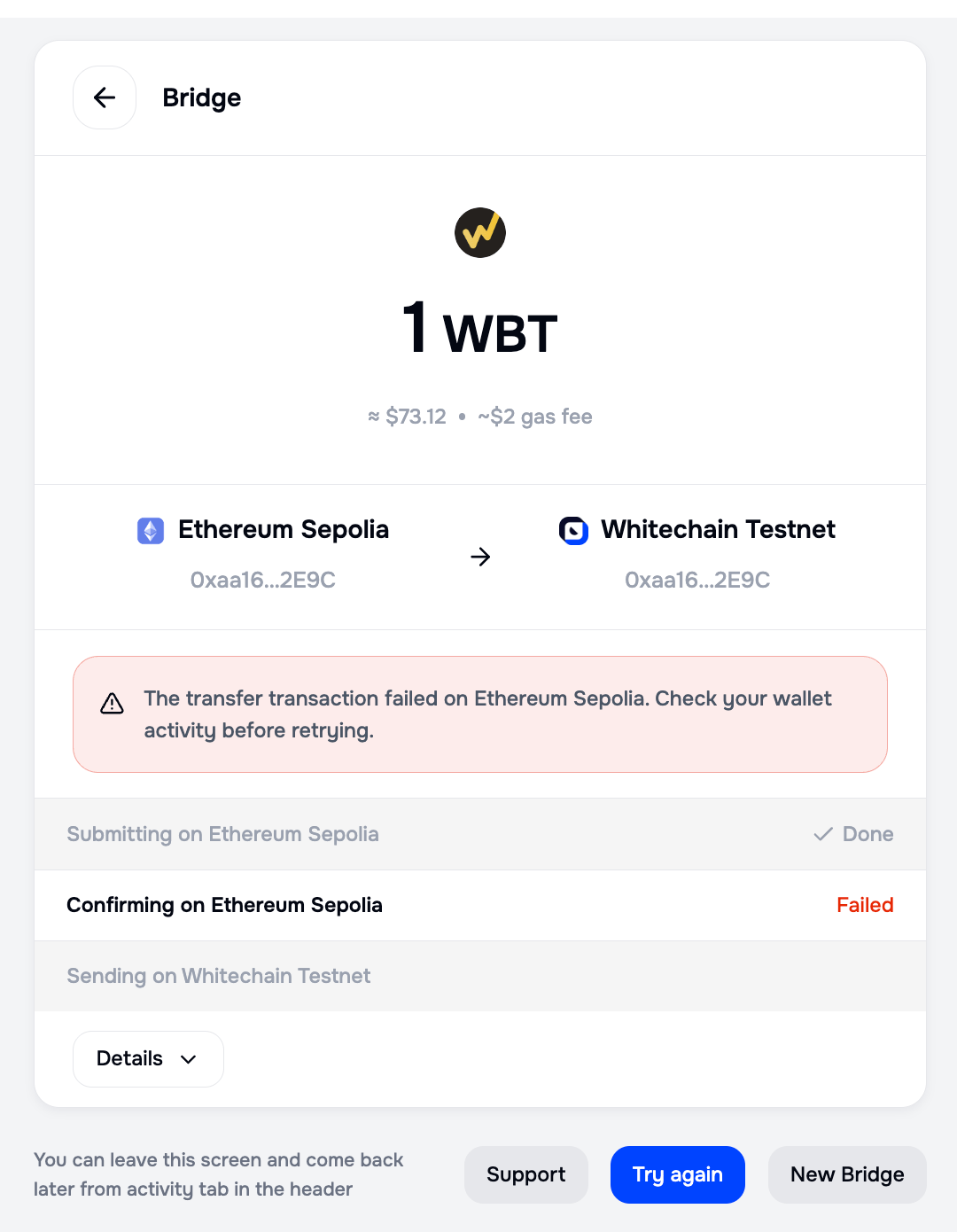 | Action | When to use it |
| ---------- | ---------------------------------------------------------------------------------------------------------------------------- |
| Try again | Retry the same transfer. Check your wallet activity first, so you do not send a second transfer for one that did go through. |
| Support | Reach support with this transfer already on screen. |
| New Bridge | Leave this transfer and start a different one. |
A source transaction that fails moves no tokens, so the amount stays in your wallet. The source network still charges gas for the attempt.
A slow-mining transaction is never reported as a failed transfer.
So Failed means the transaction itself failed, not that it was taking a long time. A transfer that is merely slow stays in progress and is labelled as delayed.
## Find a past transfer
Activity in the header lists the transfers of the connected wallet, with the amount, the direction, the date, and the status. Filters narrow the list, and every row opens the same tracker as the live transfer.
| Action | When to use it |
| ---------- | ---------------------------------------------------------------------------------------------------------------------------- |
| Try again | Retry the same transfer. Check your wallet activity first, so you do not send a second transfer for one that did go through. |
| Support | Reach support with this transfer already on screen. |
| New Bridge | Leave this transfer and start a different one. |
A source transaction that fails moves no tokens, so the amount stays in your wallet. The source network still charges gas for the attempt.
A slow-mining transaction is never reported as a failed transfer.
So Failed means the transaction itself failed, not that it was taking a long time. A transfer that is merely slow stays in progress and is labelled as delayed.
## Find a past transfer
Activity in the header lists the transfers of the connected wallet, with the amount, the direction, the date, and the status. Filters narrow the list, and every row opens the same tracker as the live transfer.
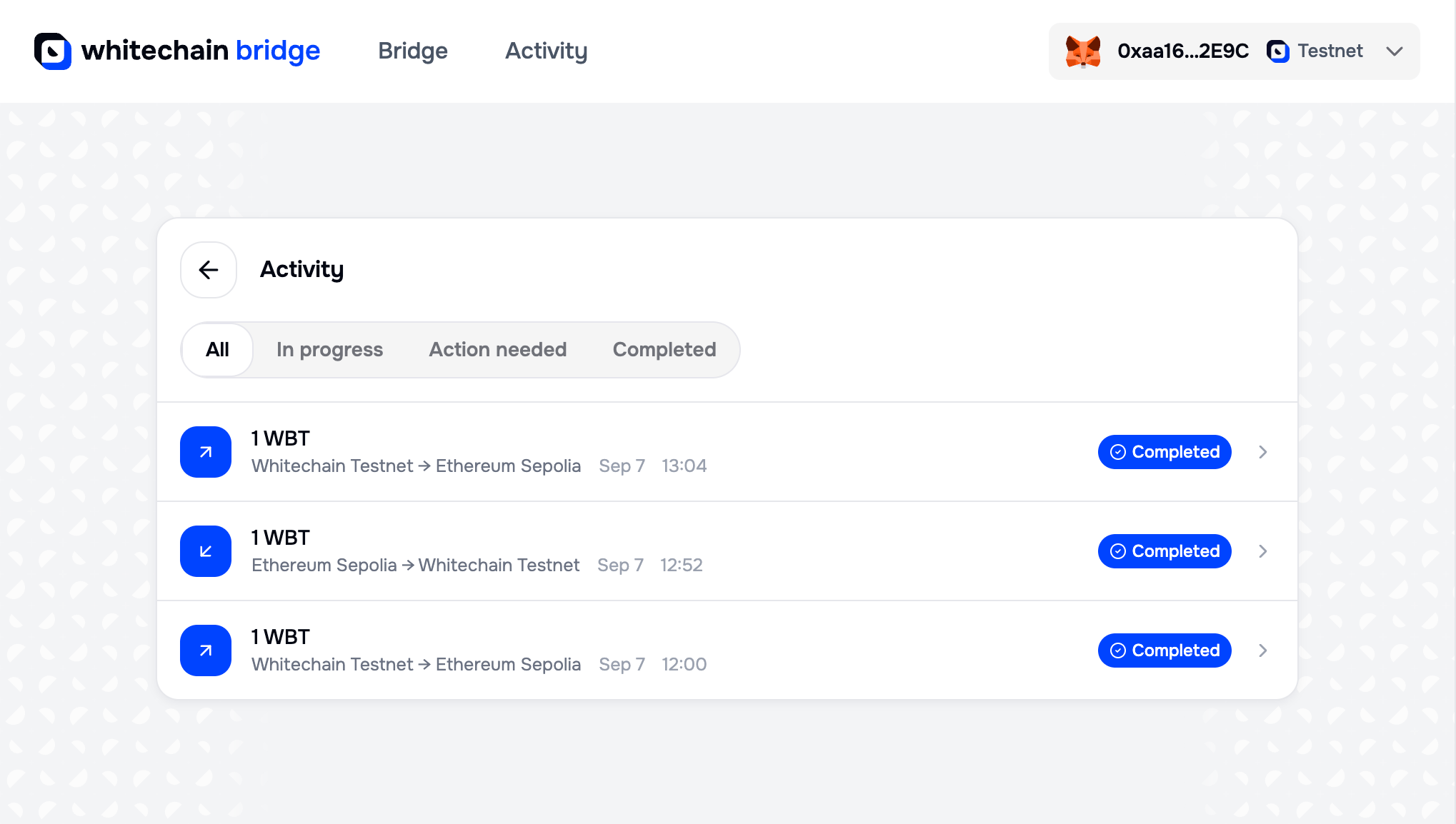 A transfer keeps its own address, so the link survives a reload, a wallet disconnect, and a new browser session. **Action needed** collects the transfers that are waiting on you.
## Manage connected wallets
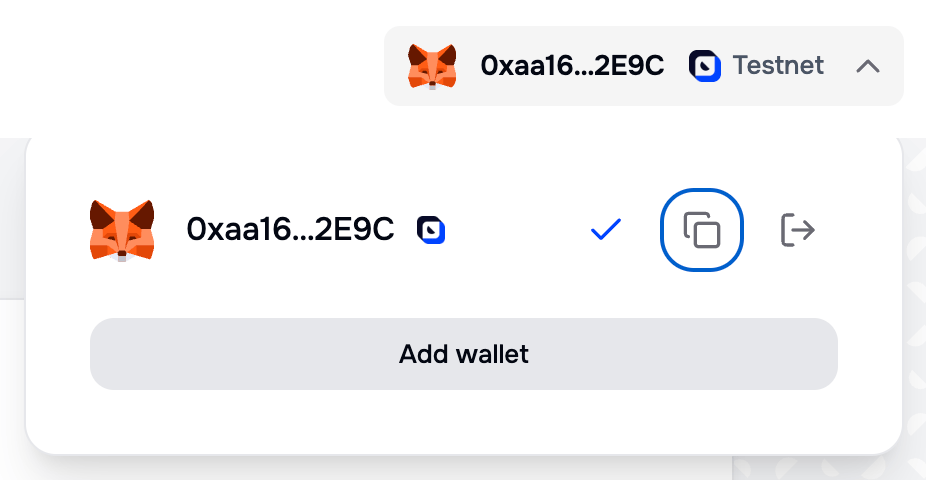
The wallet button in the header opens a popover listing what is connected. It copies the address, disconnects the wallet, and adds a second one, which is what a Tron route needs alongside an EVM wallet.
A transfer keeps its own address, so the link survives a reload, a wallet disconnect, and a new browser session. **Action needed** collects the transfers that are waiting on you.
## Manage connected wallets
The wallet button in the header opens a popover listing what is connected. It copies the address, disconnects the wallet, and adds a second one, which is what a Tron route needs alongside an EVM wallet.
 ## Custody and the alternative path
The transfer is not trustless, and the app states that on the form and again on the review screen.
Your funds sit in the Portal's Bridge contract on the source network until the relayer releases the matching amount from the Bridge contract on the destination network. No balance moves into a Whitechain wallet. What makes the transfer custodial is control rather than location: Whitechain administers both contracts and authorizes every release, so you depend on the operator instead of a protocol guarantee.
Two separate facts are easy to merge into one. The app never holds your keys, because your own wallet signs every transaction. The Bridge contracts hold your funds in transit, and Whitechain decides when they leave. The first fact does not soften the second, and speed is what the second one buys.
The OP Stack canonical contracts carry a second path between Ethereum and Whitechain, and it is available programmatically rather than through this app.
That path replaces the operator with an on-chain dispute game, which only Whitechain's configured challenger can play today. See [Fault proofs](/learn/network/transaction-finality#fault-proofs) for what the game currently guarantees, and [OP Stack canonical bridge](/build/bridge/bridge-assets) for how to use it. It is the slower path: a withdrawal waits out the dispute period.
## Related
* [Portal bridge](/build/bridge/portal-bridge)
* [OP Stack canonical bridge](/build/bridge/bridge-assets)
* [Configure a wallet](/build/wallet/wallets)
* [Get testnet WBT](/learn/get-started/get-testnet-wbt)
## Custody and the alternative path
The transfer is not trustless, and the app states that on the form and again on the review screen.
Your funds sit in the Portal's Bridge contract on the source network until the relayer releases the matching amount from the Bridge contract on the destination network. No balance moves into a Whitechain wallet. What makes the transfer custodial is control rather than location: Whitechain administers both contracts and authorizes every release, so you depend on the operator instead of a protocol guarantee.
Two separate facts are easy to merge into one. The app never holds your keys, because your own wallet signs every transaction. The Bridge contracts hold your funds in transit, and Whitechain decides when they leave. The first fact does not soften the second, and speed is what the second one buys.
The OP Stack canonical contracts carry a second path between Ethereum and Whitechain, and it is available programmatically rather than through this app.
That path replaces the operator with an on-chain dispute game, which only Whitechain's configured challenger can play today. See [Fault proofs](/learn/network/transaction-finality#fault-proofs) for what the game currently guarantees, and [OP Stack canonical bridge](/build/bridge/bridge-assets) for how to use it. It is the slower path: a withdrawal waits out the dispute period.
## Related
* [Portal bridge](/build/bridge/portal-bridge)
* [OP Stack canonical bridge](/build/bridge/bridge-assets)
* [Configure a wallet](/build/wallet/wallets)
* [Get testnet WBT](/learn/get-started/get-testnet-wbt)